Recent articles

How to choose a crypto exchanger without losing money: five things to check
Jul 29, 2026
There are dozens of exchangers, and not all of them are transparent about fees, limits, and AML policy. Here are five concrete things to check before sending a deposit anywhere.
USDT on TRC20, ERC20, BEP20 or TON: how to choose and move between networks
USDT can be sent and received on eight different networks — TRC20, ERC20, BEP20, TON, Solana, Polygon, Arbitrum and Avalanche — and an address from one network is physically meaningless on another. If you need to move tokens from, say, TRC20 to BEP20 or TON, the only way that works is an exchange: sell USDT on one network, buy it back on the other.
Why there are so many networks, and where the confusion comes from
USDT isn't a blockchain of its own — it's a token Tether issues on top of other networks. Technically, TRC20 USDT and ERC20 USDT are separate tokens sharing a ticker that trade 1:1 only because both are backed by the same Tether reserve. YellowChanger accepts and pays out USDT on eight networks: TRC20, ERC20, BEP20, TON, SOL, Polygon, Arbitrum, Avalanche.
The mix-up is usually not a beginner mistake — it's that different platforms hand out different default addresses. One exchange withdraws as TRC20 because the network fee is lower; another service expects a deposit strictly on BEP20 or TON, and the wallet the first platform gave you simply doesn't work there.
How long crediting takes on each network
To credit a deposit, YellowChanger waits for a different number of network confirmations — that's not an arbitrary choice, it's a parameter tied to each blockchain's own architecture and track record:
TON — 1 confirmation
BEP20 — 5 confirmations
ERC20 — 6 confirmations
TRC20 — 20 confirmations
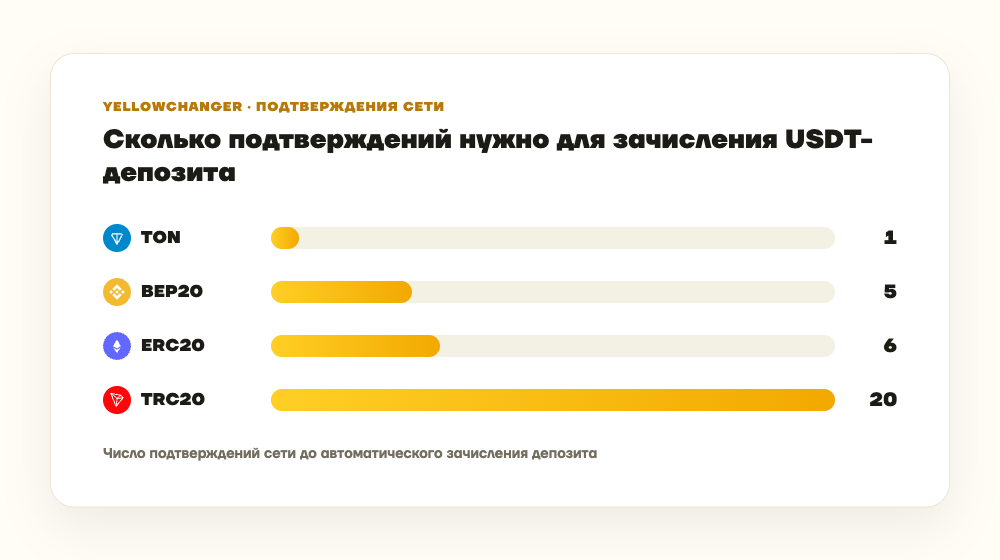
How many network confirmations a USDT deposit needs on YellowChanger
TON and TRC20 differ by a factor of twenty: Tron can physically produce blocks fast, but YellowChanger still waits for more confirmations to reach the same level of assurance — the network has a different history and a different cost of attacking a short chain of blocks.
How to move USDT between networks on YellowChanger
The mechanics are the same as any other exchange: pick the pair you need, say USDT (TRC20) → USDT (BEP20) or USDT (TRC20) → USDT (TON), enter the receiving address on the target network, and send the deposit. For the reverse direction — moving tokens from TON to BEP20, for instance — use the USDT (TON) → USDT (BEP20) pair.
In "Yellow" mode the rate is locked for 10 minutes from when the request is created. "Green" mode floats with the market and charges fees starting at 0.6% at the base tier, dropping to as low as 0.2% under the loyalty program as monthly volume grows. No identity verification is required — instead of KYC, an automatic AML check screens the sending address: deposits scored at or under 70% risk with less than 0.1% flagged exposure clear without manual review.
FAQ
Which USDT network is fastest?
By the number of confirmations YellowChanger waits for before crediting a deposit — TON, with just one, versus 20 for TRC20 and 6 for ERC20.
Can I send USDT from TRC20 straight to a BEP20 or TON address?
No, the networks are physically incompatible at the address-format level, and sending directly would lose the funds. You need an exchange that accepts a deposit on one network and pays out on the other.
Which USDT network has lower transfer fees?
YellowChanger doesn't set the network fee — it depends on how busy that specific blockchain is at the time. TRC20 tends to be cheaper to send on most platforms than ERC20, which is why it's often the default.
Is verification required to move funds between networks?
No, no KYC is needed. Only the sending address is checked under the AML policy.
What happens if I send to the wrong network by mistake?
The service never sees that transaction, so it can't credit it — the tokens sit on a blockchain address they were never meant to reach, and recovering them (if possible at all) has to be done manually. Double-check that the network in your wallet matches the network in the exchange details before sending.